Note: This post was generated with AI tools for the sole purpose of demonstrating the rich typographic and mathematical capabilities of the Eyvan template.
A good portfolio template should feel almost invisible to the reader. It should frame the work, make writing comfortable to read, and give the site owner enough structure to keep growing without turning every new page into a design project. That is the central idea behind Eyvan: a visually restrained, content-first Jekyll template for portfolios, research notes, technical writing, and project archives.
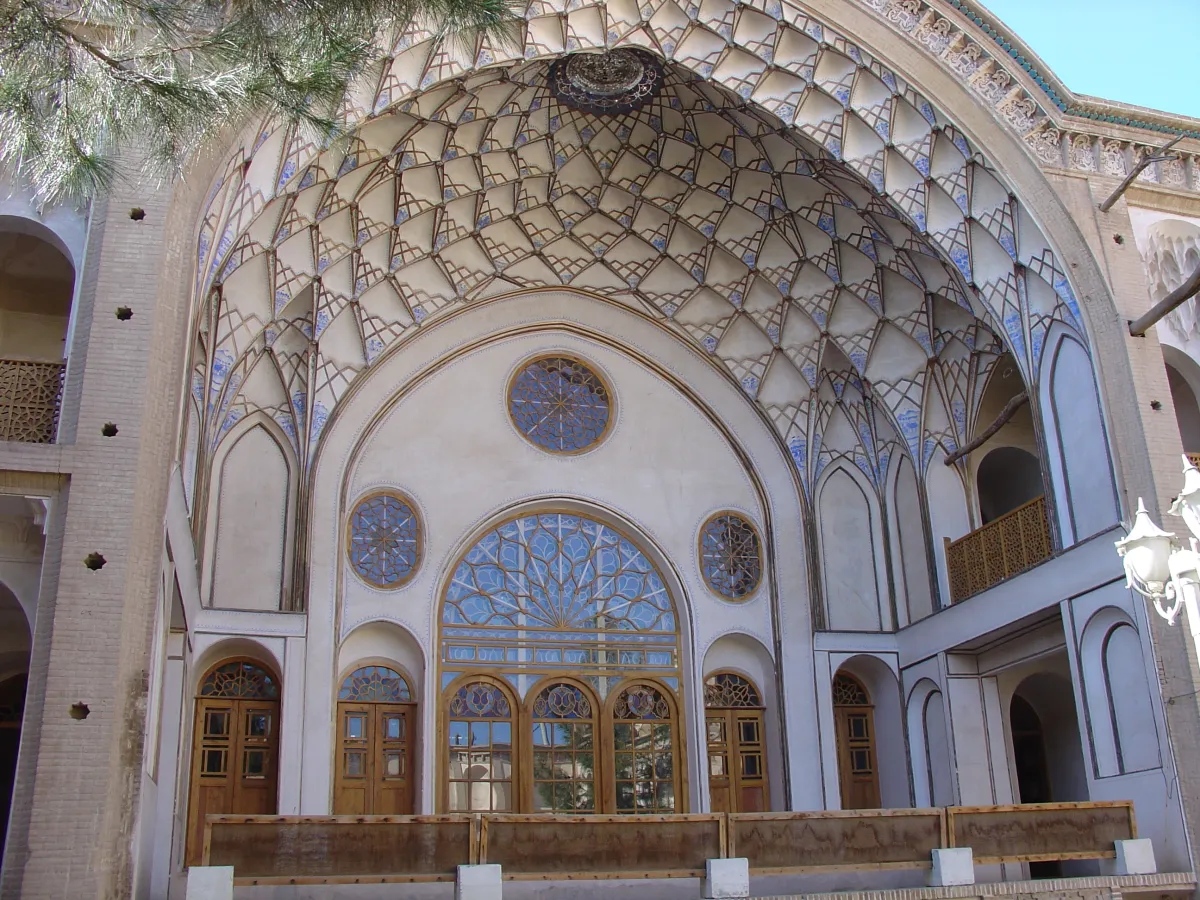
The name comes from the architectural idea of an eyvan: an open, vaulted threshold that sits between inside and outside (fig-eyvan-ameri-house).
The panjdari of the main eyvan — the open, vaulted balcony — of the Āmeri House in Kashan, Iran. Photograph by Matthias Blume, 18 November 2005, via Wikimedia Commons, licensed under CC BY-SA 3.0.
That metaphor fits the template well. A portfolio is also a threshold. It is not only a private archive, and it is not only a public résumé. It is a framed space where writing, projects, identity, and navigation meet.
This post explains how the template is organized, why the architecture is deliberately structured, and how the design system supports content-heavy posts without depending on a JavaScript framework.
Design philosophy
Content first, decoration second
The template is designed around one simple rule: the content should always win. Headings, body text, figures, tables, code blocks, and project cards are the main interface. Decorative effects are allowed only when they improve orientation, hierarchy, or clarity.
That is why the visual language is restrained. The layout uses generous spacing, readable line lengths, clear section rhythm, and a focused but comprehensive set of reusable components. Instead of using heavy animations or complex page transitions, the design relies on structure: containers, grids, cards, captions, and navigation landmarks.
The goal is not to make every page look identical. The goal is to make every page feel like it belongs to the same system.
Minimal visual design does not mean an empty feature set
Minimal design is sometimes confused with removing everything. In Eyvan, minimal refers to the visual language: the interface avoids unnecessary decoration and keeps attention on the content. The template itself is intentionally capable. It includes a real header, social links, a theme toggle, project cards, post metadata, table of contents support, responsive media, captions, tags, sharing controls, cross-references, and related posts. Each piece has a specific job.
The design avoids over-styling Markdown output. A table should look like a table. A figure should look like a figure. A code block should be easy to scan. The template adds enough visual treatment to make these elements professional, but not so much that the styling competes with the content.
No JavaScript framework
The site does not need React, Vue, Svelte, or a frontend build pipeline. Jekyll already provides the core content model: layouts, includes, data files, Markdown rendering, Sass compilation, and static output. For a portfolio site, that is usually enough.
This keeps the mental model small:
- Write content in Markdown.
- Add metadata in front matter.
- Compose pages with Liquid layouts and includes.
- Style the system with SCSS.
- Build and deploy a static site.
That simplicity matters because the best portfolio architecture is the one you will actually maintain.
Technology stack
The stack is deliberately conservative. Each tool solves a specific problem and avoids unnecessary moving parts.
Core technologies used by Eyvan.
| Tool |
Role |
Why it belongs |
| Jekyll |
Static site generator |
Converts Markdown, layouts, includes, Sass, and data files into a deployable static site. |
| Liquid |
Template language |
Handles reusable includes, conditional rendering, loops, and page metadata. |
| kramdown with GFM |
Markdown engine |
Supports GitHub-flavored Markdown patterns, automatic heading IDs, tables, footnotes, and math output. |
| MathJax |
Math renderer |
Enables LaTeX-style inline and display math on pages that opt in with math: true. |
jekyll/tagging |
Tag archive generation |
Creates browsable topic pages for posts and projects. |
jekyll-sitemap |
SEO support |
Generates a sitemap for search engines. |
jekyll-feed |
Syndication |
Generates an Atom/RSS feed at /feed.xml and a discovery link in every page head. |
| SCSS |
Styling language |
Provides variables, mixins, partial organization, and compiled CSS. |
| GitHub Actions |
Build pipeline |
Builds the site with plugins that GitHub Pages does not process by default. |
The most important architectural choice is that the stack is Jekyll-first. Features are built with layouts, includes, front matter, and SCSS before reaching for custom JavaScript. JavaScript is used only where it improves behavior: theme initialization, mobile navigation, table of contents interaction, social sharing, back-to-top scrolling, cross-references, and conditional third-party loading.
The front matter and config are the control panel. For example, posts use the post layout by default, sharing is enabled by default, and read time is controlled globally:
# _config.yml
markdown: kramdown

kramdown:
  auto_ids: true
  input: GFM
  math_engine: mathjax

plugins:
  - jekyll-sitemap
  - jekyll/tagging
  - jekyll-feed

defaults:
  - scope:
      type: posts
    values:
      layout: post
      share: true

sass:
  sass_dir: _sass
  style: compressed

words_per_minute: 238
read_time: true
CSS architecture
The stylesheet architecture follows ITCSS: Inverted Triangle CSS. The idea is to organize styles from the most abstract and widely shared rules to the most specific utilities and overrides. This makes the cascade easier to reason about because low-level decisions appear early and component-specific decisions appear later.
In this template, the Sass source is organized as ITCSS layer directories. The compiled stylesheet is assembled from assets/css/main.scss, which imports partials from these directories in layer order:
ITCSS layers and their responsibilities.
| Layer |
Directory/import group |
Role |
| Settings |
_sass/0-settings/ |
Design tokens: colors, spacing, typography, breakpoints, and configuration values. |
| Tools |
_sass/1-tools/ |
Mixins and helpers used by later layers. |
| Generic |
_sass/2-generic/ |
Resets, box sizing, global normalization, and low-specificity baseline rules. |
| Base |
_sass/3-base/ |
Default element styling for HTML, body, headings, links, media, tables, lists, and syntax highlighting. |
| Objects |
_sass/4-objects/ |
Reusable layout patterns such as containers, grids, hero structure, site header layout, site footer layout, and prose measure. |
| Components |
_sass/5-components/ |
Specific UI components such as buttons, nav, cards, hero, post layout, TOC, media figures, and theme toggle. |
| Layouts |
_sass/6-layouts/ |
Page-level composition for the homepage, projects page, tag pages, and default shell spacing. |
| Trumps |
_sass/7-trumps/ |
Utilities, state helpers, print rules, and high-priority overrides. |
This structure separates what something is from where it sits. For example, .c-button controls button appearance, while .l-projects__tags-list controls the spacing of tag links on the projects page. That distinction prevents component styles from becoming tangled with page-specific layout rules.
BEM naming style
The class naming follows a practical BEM pattern with prefixes:
.c-post-card {
}
.c-post-card__title {
}
.c-post-card__meta {
}
.c-post-card--featured {
}

.o-grid {
}
.o-grid__item {
}
.o-grid__item--span-6 {
}

.l-projects {
}
.l-projects__archive {
}

.u-visually-hidden {
}
.is-active {
}
The prefix communicates the layer at a glance:
c- means componento- means layout objectl- means page layoutu- means utilityis- means state
This keeps templates readable. When you see o-grid, you know it handles layout. When you see c-post-card, you know it is a styled component. When you see l-homepage, you know it is page-specific composition.
Layout system
The container
The .o-container object controls horizontal page width. It gives pages a consistent outer frame so that the header, hero, project archive, post cover image, and footer align visually.
A typical page starts like this:
<div class="o-container">
  <div class="l-projects">
    <!-- page content -->
  </div>
</div>
The container is intentionally boring. That is a strength. It creates a stable page boundary without mixing in card styles, text styles, or page-specific spacing.
The grid
The .o-grid object provides a 12-column responsive grid. Items span all 12 columns by default, then use modifiers such as o-grid__item--span-tablet-6 or o-grid__item--span-desktop-6 for wider screens.
<div class="o-grid">
  {% for post in site.posts limit:6 %}
  <div
    class="o-grid__item o-grid__item--span-12 o-grid__item--span-tablet-6 o-grid__item--span-desktop-6"
  >
    {% include post-card.html post=post %}
  </div>
  {% endfor %}
</div>
The result is a reusable grid system that works for project cards, homepage sections, and broad layout composition.
The prose measure
Long-form reading depends on line length. If text is too wide, the reader loses their place. If text is too narrow, the rhythm becomes choppy. The .o-prose object solves that by constraining the measure of article content.
The post layout applies:
<div class="o-prose o-prose--measure-wide">
  <!-- rendered Markdown content -->
</div>
This allows code blocks, tables, figures, paragraphs, lists, and headings to share a consistent reading rhythm.
The 3-column post layout
The post layout uses a three-column desktop structure:
left gutter | prose column | table of contents
The left gutter is intentionally empty. It balances the right-side table of contents so the prose remains visually centered. On smaller screens, the layout collapses into a single column and the table of contents becomes a mobile/tablet toolbar and panel.
<div class="c-post-layout">
  <div
    class="c-post-layout__col c-post-layout__col--left"
    aria-hidden="true"
  ></div>

  <div class="c-post-layout__col c-post-layout__col--main">
    <div class="c-post-layout__prose">
      <div class="o-prose o-prose--measure-wide">{{ content }}</div>
    </div>
  </div>

  <div class="c-post-layout__col c-post-layout__col--right">
    {% include post-toc-desktop.html %}
  </div>
</div>
This is one of the template’s most important design decisions. It supports long articles without making the page feel crowded. The reader gets a focused article column, while the TOC remains available for orientation.
Component inventory
The template is built from small components that can be reused across layouts. The table below lists the major c-* components and their purpose.
Major reusable components in Eyvan and where they appear.
| Component |
Purpose |
Typical location |
c-brand |
Logo, name, and role link used as the site identity. |
Header, footer, mobile menu |
c-site-header |
Global header shell for brand, navigation, theme toggle, and actions. |
Default layout |
c-nav |
Primary navigation list with desktop and mobile modifiers. |
Header, mobile menu |
c-mobile-menu |
Responsive expanded navigation for smaller screens. |
Header include |
c-theme-toggle |
Light/dark theme control. |
Header, mobile menu |
c-button |
Shared button and tag-link styling. |
Hero, tags, CTAs, archive links |
c-hero |
Homepage introduction with text, CTA links, and image. |
Homepage |
c-section-heading |
Reusable heading block for major page sections. |
Homepage, projects, tag pages |
c-post-card |
Card preview for posts and projects. |
Homepage, projects archive, related posts |
c-post |
Main article shell for long-form posts. |
Post layout |
c-post-cover |
Optional cover image area above the article header. |
Post layout |
c-post-layout |
Three-column article composition with left gutter, prose, and TOC. |
Post layout |
c-toc |
Desktop table of contents navigation. |
Post layout |
c-mobile-toc |
Mobile/tablet table of contents panel. |
Post layout |
c-prose-figure |
Responsive single images, multi-image figure grids, audio, and video with captions. |
Markdown posts via includes |
c-prose-table |
Styled Markdown or HTML tables inside long-form content. |
Markdown posts |
c-site-footer |
Minimal footer with brand, metadata, and social links. |
Default layout |
This inventory is useful because it creates a shared vocabulary. Instead of thinking “the thing that appears below the hero,” you can think “section heading plus grid plus post cards.” That makes changes easier to scope.
Feature flags
Many post features are controlled by front matter. This keeps content files explicit and avoids loading unnecessary features on every page.
Enable math
Use math: true only when a post contains LaTeX-style math. For example, the template can render a simple performance ratio such as $R = \frac{content}{chrome}$ when MathJax is enabled.
The useful part is conditional loading: a non-math essay does not need MathJax, so it should not pay for MathJax.
Enable the table of contents
Use toc: true for long posts with many headings. The post TOC wrappers currently scan ## and ### headings.
A post like this one is a good stress test because it contains many second- and third-level headings. The desktop TOC improves scanning, and the mobile TOC keeps the same navigation available without permanently occupying screen space.
Disable sharing
Sharing is enabled by default for posts, but you can turn it off when a page should feel private, internal, or reference-like.
This is a good example of a feature flag that supports tone. Not every page needs the same interface.
Control read time globally
Read time is controlled globally through _config.yml. The current metadata include does not read a per-post read_time front matter value.
read_time: true
words_per_minute: 238
The global configuration uses a words-per-minute value, which keeps the estimate predictable across the site. To support per-post read-time overrides, the metadata include would need to be changed.
Enable cross-references
Use crossrefs: true when a post uses {% include ref.html %} to point to numbered figures, tables, videos, or audio blocks.
The ref.html include creates the link, and assets/js/crossref.js resolves the displayed text to values such as “Figure 1” or “Table 2.”
Static sites are fast by default, but performance still depends on restraint. This template uses several small decisions that add up.
Compressed Sass output
The Sass configuration outputs compressed CSS:
sass:
  sass_dir: _sass
  style: compressed
That keeps the final CSS smaller while preserving readable source SCSS in the repository.
Image loading priorities
Post cover images, prose media, and most post-card covers use loading="lazy",
which allows the browser to delay loading images until they are needed.
<img
  class="c-post-cover__image"
  loading="lazy"
  src="{{ page.image | relative_url }}"
  alt="{{ page.image_alt | default: page.title | escape }}"
/>
The homepage gives eager loading and high fetch priority to two likely
above-the-fold images: the hero image and the first post-card cover. Remaining
homepage cards, project and tag archives, related posts, and long-form media
stay lazy-loaded. This keeps the likely Largest Contentful Paint candidates
responsive without eagerly fetching the entire archive.
Pinned MathJax CDN Integration
MathJax is loaded from an exact, integrity-protected CDN release and only when
the page opts in:
{% if page.math %}
<script>
  window.MathJax = {
    loader: {
      load: ["[tex]/braket"],
    },
    tex: {
      inlineMath: [
        ["$", "$"],
        ["\\(", "\\)"],
      ],
      displayMath: [
        ["$$", "$$"],
        ["\\[", "\\]"],
      ],
      processEscapes: true,
      packages: {"[+]": ["braket"]},
    },
  };
</script>

<script
  id="MathJax-script"
  defer
  src="https://cdn.jsdelivr.net/npm/mathjax@4.1.2/tex-chtml.js"
  integrity="sha384-zAhQQhdaMeHsMProNntGGg6nOUVcfuF9F22C3d1qJ9NZAVzCplXk1X85D2O5iufn"
  crossorigin="anonymous"
  referrerpolicy="no-referrer"
></script>
{% endif %}
This keeps the repository lightweight while avoiding mutable production code.
The integrity hash protects the entry bundle; exact version pinning also keeps
dynamically requested MathJax components on the reviewed release. Some posts
need equations; many do not.
Conditional integrations
The head include centralizes SEO, canonical links, feed discovery, Open Graph metadata, Twitter card metadata, favicons, theme-color handling, stylesheet loading, and optional analytics. Analytics loads only when a measurement ID exists, which keeps local development and early templates clean.
Extension points
A good template should be easy to extend without rewriting its architecture. In Eyvan, the safest extension points are layouts, includes, data files, and SCSS components.
Add a new layout
Create a new file in _layouts, then compose existing objects and components.
---
layout: default
---

<div class="o-container">
  <div class="l-notes">
    {% include section-heading.html id="notes-title" heading_level="h1"
    title=page.title description=page.description %}

    <div class="o-prose o-prose--measure-wide">{{ content }}</div>
  </div>
</div>
Then add layout-specific spacing in the layouts layer:
/* --- ################################################ --- */
/* --- Sub-file: _notes.scss --- */

@use "../0-settings/spacing" as settings-spacing;

.l-notes {
  display: grid;
  gap: settings-spacing.$space-6;
}
Add a new component
For a new component, start with a focused include and one component block. Do not put page layout into the component unless the component truly owns that layout.
<div class="c-callout c-callout--{{ include.type | default: 'note' }}">
  {% if include.title %}
  <p class="c-callout__title">{{ include.title }}</p>
  {% endif %}

  <div class="c-callout__body">{{ include.content | markdownify }}</div>
</div>
/* --- ################################################ --- */
/* --- Sub-file: _callout.scss --- */

@use "../0-settings/config" as settings-config;
@use "../0-settings/spacing" as settings-spacing;
@use "../0-settings/typography" as settings-type;

.c-callout {
  padding: settings-spacing.$space-4;
  border: settings-config.$global-border-width solid var(--color-outline-variant);
  border-radius: settings-config.$global-radius;
  background-color: var(--color-surface-container-high);
  color: var(--color-on-surface);
}

.c-callout__title {
  margin-block: 0 settings-spacing.$space-2;
  font-weight: settings-type.$font-weight-bold;
}
Note the split: geometry and type come from Sass tokens through @use, while
color comes from CSS custom properties. That is deliberate — geometry is fixed
at build time, but color has to change with the theme at runtime. Theming
Eyvan covers the full palette and which role to reach for.
Add a new include
Includes should do one job. For example, the figure include renders image figures; the audio include renders audio; the video include renders video. This is better than one enormous media include with too many modes.
A good include has:
- A short purpose comment.
- Clear required parameters.
- Safe defaults.
- Accessible output.
- BEM classes that match the component layer.
Add new data-driven navigation
Navigation is data-driven, so adding links should happen in the navigation data file rather than hard-coding links into the header. The navigation include handles internal URLs, external links, active states, and development-only items.
That keeps the header focused on composition and the navigation focused on rendering links.
Why this architecture works
The architecture works because it divides responsibility clearly.
Jekyll owns content generation. Liquid owns composition. Front matter owns page-level decisions. _config.yml owns site-level defaults. SCSS owns visual systems. ITCSS controls the cascade. BEM keeps classes understandable. Small includes keep markup reusable. The post layout gives long-form writing a stable reading experience.
Most importantly, the template does not try to become an application. It remains a static portfolio system. That restraint is what makes it maintainable.
For a personal portfolio, the hardest problem is rarely technical complexity. The harder problem is consistency over time: adding new posts, updating projects, changing navigation, improving design, and keeping the site coherent as it grows. Eyvan solves that by providing a deliberately structured architecture with clear extension points.
The result is a site that feels calm, readable, and professional: content framed, not boxed; structure visible, but unobtrusive.
Endnotes